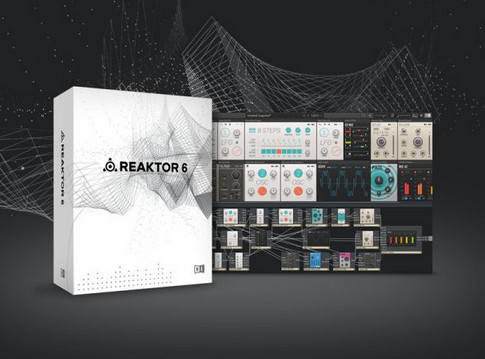
Reaktor 6 نام یکی از بهترین محصولات شرکت Native Instruments می باشد و از محبوبیت بسیار بالایی برخوردار است ، Reaktor 6 یک پلیر پیشرفته می باشد که به ۲ صورت اصلی اینسترومنت و افکت در نرم افزار های آهنگسازی اجرا می شود ، همواره وی اس تی ها و پلاگین های جدیدی منتشر می شود که تنها با استفاده از این پلیر قابل استفاده می باشند ، Reaktor 6 به صورت پیش فرض دارای چند پلاگین در بخش افکت و چند وی اس تی در بخش اینسترومنت می باشد که پس از نصب کاربر به آنها دسترسی خواهد داشت . اکنون می توانید آخرین نسخه از Reaktor 6 همراه با بانک صدای شرکتی را برای سیستم عامل ویندوز به همراه کرک معتبر از R2R دریافت نمایید .
Release Notes:
۶٫۴٫۰ — ۲۰۲۰-۰۷-۲۳
• User Blocks for Racks.
• ADDED Users of the full version of REAKTOR 6 can load User Blocks into Racks
• ADDED Users of REAKTOR 6 Player can load User Blocks in Demo mode (muted after
۳۰ minutes)
• ADDED User Blocks are stored in the Rack file with a reference to their file path
• ADDED Missing User Blocks are displayed when loading a Rack and can be relocated
• ADDED User Block root directory to allow relative file paths and enable sharing
of Racks between users
• ADDED Browse for User Blocks via the Library Tab and via the Quick Search Box on Panel
• ADDED Relocate additional User Blocks in same directory
• ADDED Custom User Blocks directory in preferences
• ADDED Block relocation page with scrollbar for too many blocks
• ADDED New Patching with Blocks manual including comprehensive information about
using Blocks in Racks and Ensembles
• CHANGED Clean up Preferences Directory Tab
• CHANGED Show Custom User Blocks directory in the Library and Player tabs
• CHANGED Appearance of Sub Instruments in Blocks for Racks
• CHANGED Enhance UX/UI for Instrument not Found page
• CHANGED Allow Blocks with sub-instruments
• CHANGED Rack files store and load User Blocks with path relative to User Blocks
root directory
• CHANGED Appearance of sub-instruments in Rack changed (not on panel, not in panel
sets, not in Midi connection drop down)
• FIXED CRASH – on changing table size
• IXED CRASH – on relocation of ISM with special characters
• FIXED CRASH – on relocation of instruments with sub instruments in Rack
• FIXED CRASH – on using the Quick Search in Rack Mode
• FIXED CRASH – when trying to relocate a wrong ISM for a Rack
• FIXED CRASH – ASIO card swapping crashes Reaktor
• FIXED CRASH – On Audio Device Sample Rate Change by other App
• FIXED CRASH – on duplicating 2 instruments after selection on panel
• FIXED On Panel: Hitting delete Key while Panel Element was selected deleted its
connctions in strucuture
• FIXED Splitter/Handle in Panel Sets and Snapshot tabs did not remember its position
in HostChunk, Ensemble and Rack file
• FIXED Mac only: after one time use of editing fields keyboard input is faulty
• FIXED Demo Dialog should be user resizable and be resized to maximum on popup
• FIXED User Blocks with PID can not be relocated
• FIXED Delete Key deletes all wires connected to a Panel Element if it is selected
• FIXED Browser needs longer for scanning big ensemble files
• FIXED Saving Rack file with references to Blocks from absolute path show missing
Blocks on reload
• FIXED UI Glitch, Panel Wires drawn in Side-pane + Toolbar
• FIXED Loading Time increased x3 for Ensembles like flesh
• FIXED Rack file doubles up Midi Notes sent and received from and to instruments
internally
• FIXED Flickering Rack Panel UI when drag&drop Blocks from Browser
• FIXED Rack Bank and Sub Bank does not affect saving process / dialog
• FIXED Ensemble Name editable on panel although header invisible
• FIXED Subinstrument still visible in panel when loaded into rack
• FIXED Changed Flag not set on Storing Snapshot via ST Input of Snapshot Module
• FIXED Properties snapshot Id for Files value stays hierarchically relative unique on
editing
• FIXED Save Rack behaves like Save Rack As
Install Notes:
Just install and enjoy!
Factory Library v1.1.0.3
Factory Selection R2 v1.0.1.7
مشخصات و توضیحات فایل
اطلاعات مهم پیش از دانلود و نصب
taranesaz.comآموزش نصب و راهاندازی
مراحل نصب را دقیق و بهترتیب انجام دهید
این محتوا قفل و محدود شده است لطفا عضو شوید
لینکهای دانلود
دسترسی سریع، مستقیم و مخصوص اعضای ویژه
این محتوا قفل و محدود شده است لطفا عضو شوید







گفتوگو و دیدگاهها
پرسش خود را شفاف بنویسید تا پاسخ دقیقتری دریافت کنید.
هنوز دیدگاهی ثبت نشده است
اولین نفری باشید که درباره این مطلب پرسش یا تجربه خود را مینویسد.